> ## Documentation Index
> Fetch the complete documentation index at: https://docs.karchunt.com/llms.txt
> Use this file to discover all available pages before exploring further.
# Cluster Architecture
## Cluster & Node Concepts
Let's understand the basic concepts of **Cluster** and **Node** in Kubernetes.
```mermaid theme={"theme":"github-dark-dimmed"}
flowchart
subgraph "Cluster"
id["Master Node (Control Plane)"]
id1["Node 1 (Worker Node)"]
id2["Node 2 (Worker Node)"]
end
```
A Kubernetes **cluster** is a **set of nodes grouped together** to run containerized applications. It consists of a **control plane (master node)** and **worker nodes** which can help to **distribute workloads** across multiple machines, **providing high availability and scalability**.
For example, the application will still be accessible even if one of the worker nodes fails, as the workload can be automatically rescheduled to another node in the cluster.
A node is a **worker machine**, it can be either a physical or virtual machine depending on the Kubernetes cluster.
Each of the node is **managed by the control plane (master node)** and a node can have **multiple pods** running on it. This is also where the **containers will be launched and executed**. The node is responsible for **running the pods** and **providing the necessary resources** (CPU, memory, etc.) for the containers to run.
For example, if you have a cluster with 3 worker nodes, and you deploy an application that requires 3 replicas, Kubernetes will automatically distribute the pods across the available nodes to ensure high availability and efficient resource utilization.
## Core Components
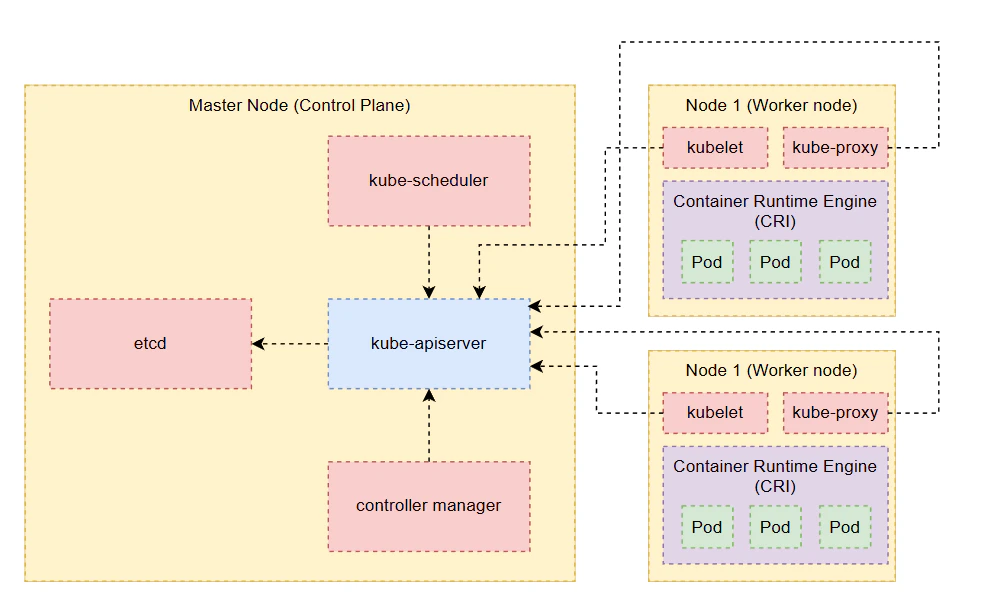 Before we dive into the architecture of a Kubernetes cluster, let's briefly review the **core components** that make up a Kubernetes cluster:
```mermaid theme={"theme":"github-dark-dimmed"}
flowchart
subgraph "Master Node (Control Plane)"
id1[Controller Manager] --> kube-apiserver
id2[kube-scheduler] --> kube-apiserver
kube-apiserver --> id[ETCD cluster]
end
```
The **control plane (master node)** is a node that is responsible for **managing the cluster**, **planning**, **scheduling the pods** to run on the worker nodes, and **monitoring the cluster's state** to ensure that the desired state of the cluster is maintained. Basically, it stores the information regarding the cluster such as the nodes, pods, configs, and more.
Also, it will **transfer the workload of the failed node** to another **healthy node** to ensure the availability of the application.
You can think of the control plane as the **brain** of the Kubernetes cluster, it makes all the decisions and manages the overall state of the cluster. These tasks are performed by the master node through a set of components known as the **control plane components**, which include:
* **kube-apiserver** - It is the **front-end** of the Kubernetes control plane that **exposes** the Kubernetes HTTP API. It's the **entry point** for all the REST commands used to **manage (orchestrate) the cluster operations**.
* **ETCD** - It's a **distributed key-value store** that is used to **store all the cluster data**, including the state of the cluster, configuration, date, and metadata.
* **kube-scheduler (scheduler)** - It is responsible for **identifying and scheduling** the pods on nodes. It **only decides** which pod goes to which node, but it does not actually deploy the pod on the node, that is the responsibility of the kubelet.
* **kube-controller-manager** - It is responsible for **managing various controllers** that are responsible for **ensuring the desired state of the cluster**. Each controller has different functions to take care of its side, such as:
* **Node Controller** - It is responsible for **monitoring the nodes** and **taking action** when a node goes down or becomes unresponsive.
* **Replication Controller** - It is responsible for **ensuring that the desired number of pod replicas** are running at any given time.
* **Endpoints Controller** - It is responsible for **managing the endpoints** that are used to connect services to pods.
* **Service Account & Token Controllers** - They are responsible for **managing service accounts and tokens** that are used for authentication and authorization in the cluster.
Master node can be **hosted** in the form of **container**.
```mermaid theme={"theme":"github-dark-dimmed"}
flowchart
subgraph "Worker Node"
id1[kubelet]
id2[kube-proxy]
id3[container-runtime]
end
```
The **worker node** is a node that is responsible for **hosting application as containers** and **running the applications**. It's where the actual work happens in the Kubernetes cluster. The worker node is **managed by the control plane (master node)** and it runs the pods that are **scheduled by the kube-scheduler**.
The worker node consists of the following components:
* **kubelet** - It is responsible for **registering the node** with the **kube-apiserver**. It will **create the pod** on the node when it **receives the instructions** from the **kube-apiserver**, and **monitor the node** and **container/pod state** to ensure that the desired state of the cluster is maintained.
* **kube-proxy** - It is reponsible for **creating/maintaining appropriate routing/network rules** when a new service is created to **establish communication** between containers via services within the cluster. It also **handles network traffic** and **load balancing** for the services running on the worker node.
* **container-runtime** - It is responsible for **running the containers** on the worker node. Kubernetes supports several container runtimes, such as **Docker**, **containerd**, and **CRI-O**. The container runtime is responsible for **pulling the container images**, **starting and stopping the containers**, and **managing the container lifecycle**.
Kubernetes supports other runtime engines that adhere to the OCI standards, like containerd or Rocket, so it is not necessary to install Docker before installing Kubernetes.
Before we dive into the architecture of a Kubernetes cluster, let's briefly review the **core components** that make up a Kubernetes cluster:
```mermaid theme={"theme":"github-dark-dimmed"}
flowchart
subgraph "Master Node (Control Plane)"
id1[Controller Manager] --> kube-apiserver
id2[kube-scheduler] --> kube-apiserver
kube-apiserver --> id[ETCD cluster]
end
```
The **control plane (master node)** is a node that is responsible for **managing the cluster**, **planning**, **scheduling the pods** to run on the worker nodes, and **monitoring the cluster's state** to ensure that the desired state of the cluster is maintained. Basically, it stores the information regarding the cluster such as the nodes, pods, configs, and more.
Also, it will **transfer the workload of the failed node** to another **healthy node** to ensure the availability of the application.
You can think of the control plane as the **brain** of the Kubernetes cluster, it makes all the decisions and manages the overall state of the cluster. These tasks are performed by the master node through a set of components known as the **control plane components**, which include:
* **kube-apiserver** - It is the **front-end** of the Kubernetes control plane that **exposes** the Kubernetes HTTP API. It's the **entry point** for all the REST commands used to **manage (orchestrate) the cluster operations**.
* **ETCD** - It's a **distributed key-value store** that is used to **store all the cluster data**, including the state of the cluster, configuration, date, and metadata.
* **kube-scheduler (scheduler)** - It is responsible for **identifying and scheduling** the pods on nodes. It **only decides** which pod goes to which node, but it does not actually deploy the pod on the node, that is the responsibility of the kubelet.
* **kube-controller-manager** - It is responsible for **managing various controllers** that are responsible for **ensuring the desired state of the cluster**. Each controller has different functions to take care of its side, such as:
* **Node Controller** - It is responsible for **monitoring the nodes** and **taking action** when a node goes down or becomes unresponsive.
* **Replication Controller** - It is responsible for **ensuring that the desired number of pod replicas** are running at any given time.
* **Endpoints Controller** - It is responsible for **managing the endpoints** that are used to connect services to pods.
* **Service Account & Token Controllers** - They are responsible for **managing service accounts and tokens** that are used for authentication and authorization in the cluster.
Master node can be **hosted** in the form of **container**.
```mermaid theme={"theme":"github-dark-dimmed"}
flowchart
subgraph "Worker Node"
id1[kubelet]
id2[kube-proxy]
id3[container-runtime]
end
```
The **worker node** is a node that is responsible for **hosting application as containers** and **running the applications**. It's where the actual work happens in the Kubernetes cluster. The worker node is **managed by the control plane (master node)** and it runs the pods that are **scheduled by the kube-scheduler**.
The worker node consists of the following components:
* **kubelet** - It is responsible for **registering the node** with the **kube-apiserver**. It will **create the pod** on the node when it **receives the instructions** from the **kube-apiserver**, and **monitor the node** and **container/pod state** to ensure that the desired state of the cluster is maintained.
* **kube-proxy** - It is reponsible for **creating/maintaining appropriate routing/network rules** when a new service is created to **establish communication** between containers via services within the cluster. It also **handles network traffic** and **load balancing** for the services running on the worker node.
* **container-runtime** - It is responsible for **running the containers** on the worker node. Kubernetes supports several container runtimes, such as **Docker**, **containerd**, and **CRI-O**. The container runtime is responsible for **pulling the container images**, **starting and stopping the containers**, and **managing the container lifecycle**.
Kubernetes supports other runtime engines that adhere to the OCI standards, like containerd or Rocket, so it is not necessary to install Docker before installing Kubernetes.