> ## Documentation Index
> Fetch the complete documentation index at: https://docs.karchunt.com/llms.txt
> Use this file to discover all available pages before exploring further.
# Network Architectures
In this section, we will explore different network architectures that can be used in various applications. Each architecture has its own advantages and disadvantages, and the choice of architecture depends on the specific requirements of the application.
## Client-Server Architecture
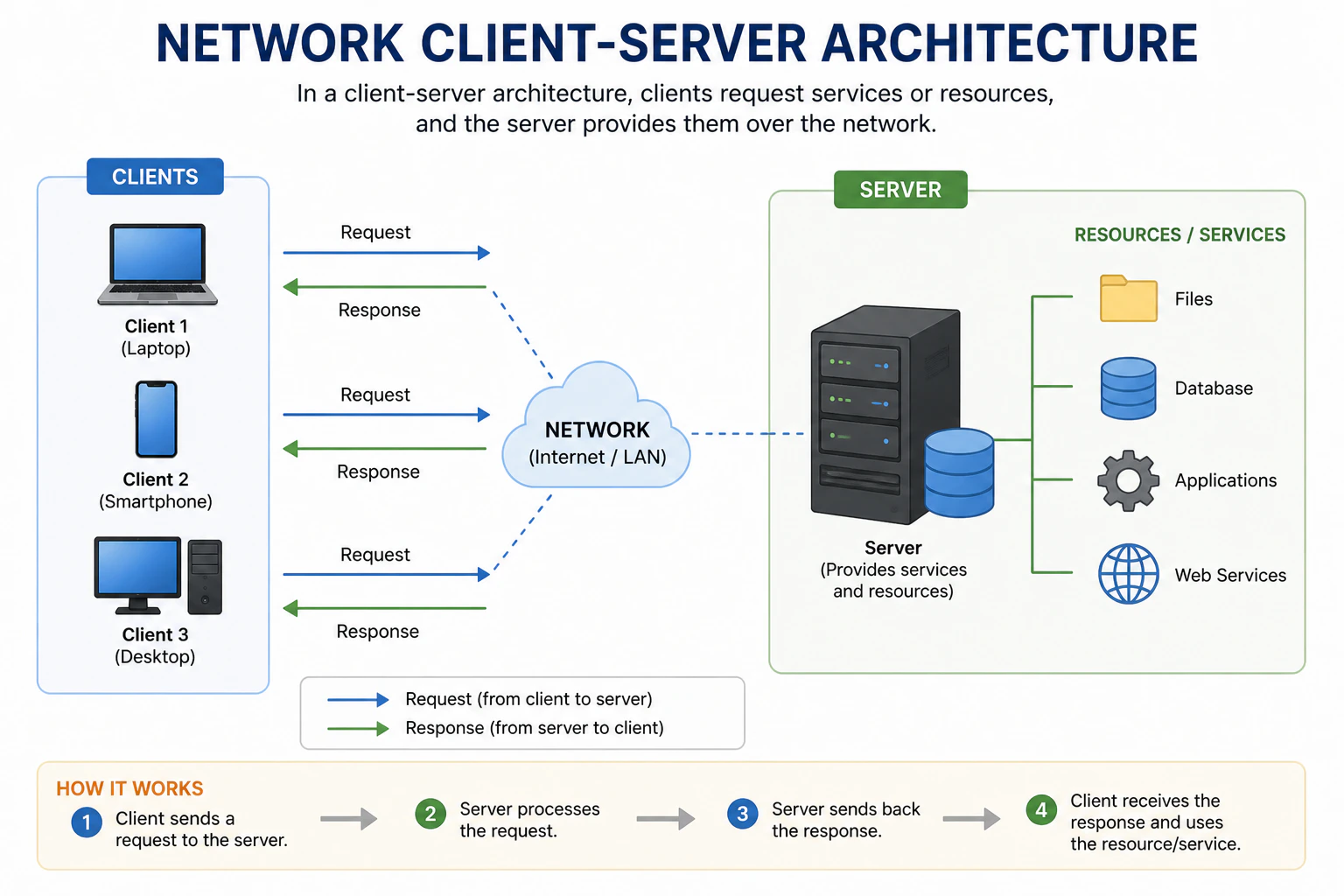 The client-server architecture is the **most common model** used in networking. In this architecture, there is a **central server** and **multiple clients**.
* **Server**: A server is a powerful, central computer that **provides/serves resources, data, or services** to multiple clients. It's always on and waiting for requests from clients. The server **processes the requests** and **sends back the appropriate responses** to the clients. Example of servers include web servers, database servers, and file servers.
* **Client**: A client is a computer or device that **requests resources or services** from the server. Clients can be anything from desktop computers, laptops, smartphones, to tablets. They **initiate communication (request)** with the server and **wait for responses**. Examples of clients include web browsers, email clients, and mobile apps.
Think of the client-server architecture like a **restaurant**.
* **Server**: The **restaurant staff (waiters, chefs)** who prepare and serve food.
* **Client**: The **customers** who come to the restaurant and order food.
The customers (clients) **request food** (resources/services) from the restaurant staff (server), who then **prepare and serve the food** back to the customers. The restaurant (server) can serve multiple customers (clients) at the same time, but the customers do not directly interact with each other.
* Easy to backup and maintain data since it's centralized on the server.
* More secure as the server can implement security measures to protect data and resources.
* Can handle multiple clients simultaneously, allowing for scalability.
* If the server goes down, clients cannot access resources or services, leading to downtime.
* Can be expensive to set up and maintain a powerful server, especially for small applications.
* Performance can be affected if too many clients request resources at the same time, leading to server overload.
## Peer-to-Peer (P2P) Architecture
The client-server architecture is the **most common model** used in networking. In this architecture, there is a **central server** and **multiple clients**.
* **Server**: A server is a powerful, central computer that **provides/serves resources, data, or services** to multiple clients. It's always on and waiting for requests from clients. The server **processes the requests** and **sends back the appropriate responses** to the clients. Example of servers include web servers, database servers, and file servers.
* **Client**: A client is a computer or device that **requests resources or services** from the server. Clients can be anything from desktop computers, laptops, smartphones, to tablets. They **initiate communication (request)** with the server and **wait for responses**. Examples of clients include web browsers, email clients, and mobile apps.
Think of the client-server architecture like a **restaurant**.
* **Server**: The **restaurant staff (waiters, chefs)** who prepare and serve food.
* **Client**: The **customers** who come to the restaurant and order food.
The customers (clients) **request food** (resources/services) from the restaurant staff (server), who then **prepare and serve the food** back to the customers. The restaurant (server) can serve multiple customers (clients) at the same time, but the customers do not directly interact with each other.
* Easy to backup and maintain data since it's centralized on the server.
* More secure as the server can implement security measures to protect data and resources.
* Can handle multiple clients simultaneously, allowing for scalability.
* If the server goes down, clients cannot access resources or services, leading to downtime.
* Can be expensive to set up and maintain a powerful server, especially for small applications.
* Performance can be affected if too many clients request resources at the same time, leading to server overload.
## Peer-to-Peer (P2P) Architecture
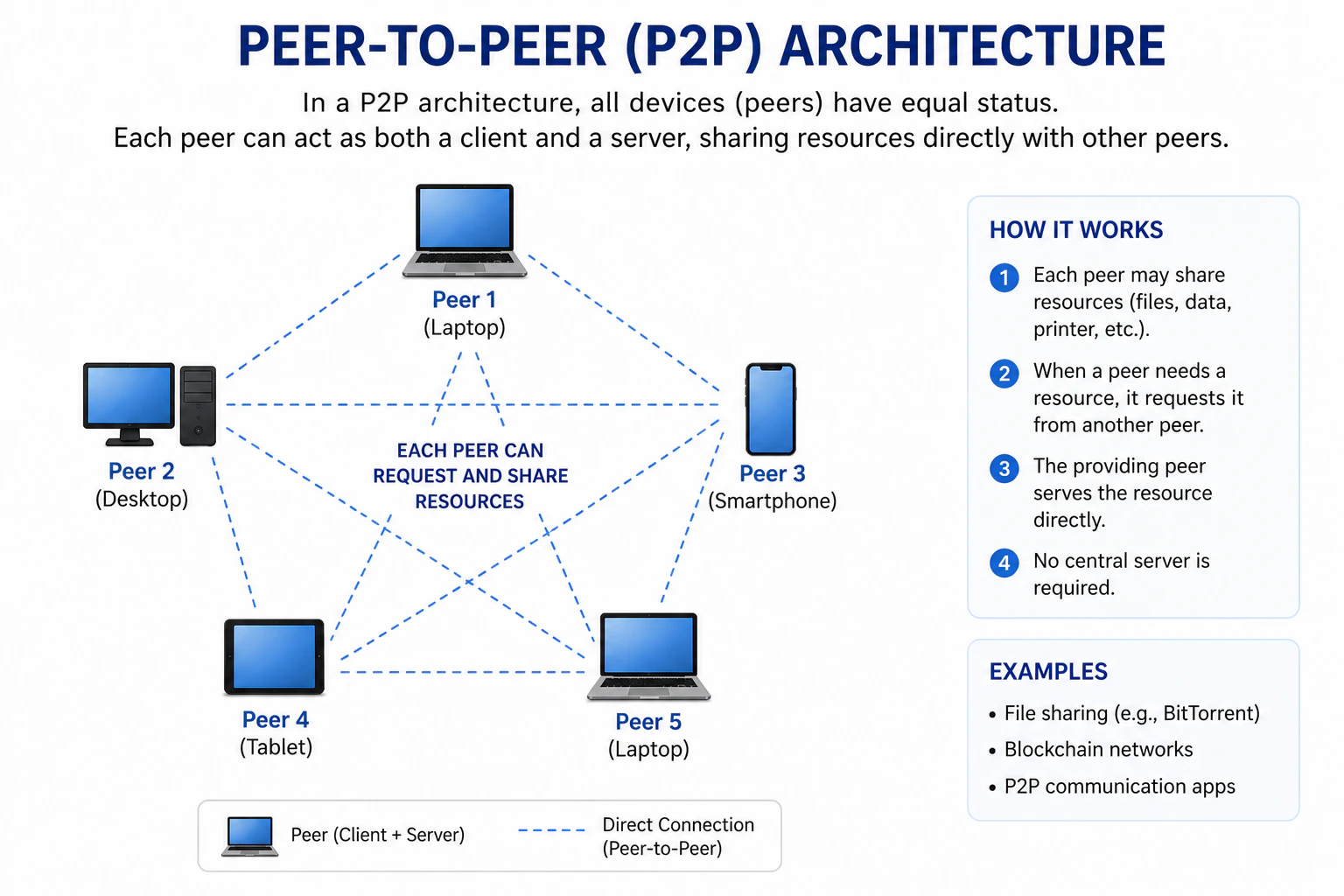 In a peer-to-peer (P2P) architecture, there is **no central server**. Instead, **all devices (peers)** in the network are **equal** and can act as **both clients and servers**.
* **Peers**: Each peer/device can **act as both a client and a server**. They can **request resources** from other peers and **provide resources** to other peers. Examples of P2P applications include file-sharing networks like BitTorrent and decentralized communication platforms.
Think of the peer-to-peer architecture like a **neighborhood**.
* **Peers**: The **residents** of the neighborhood who can both **borrow and lend** items to each other.
In this **neighborhood (P2P network)**, there is **no central authority (server)**. Each resident (peer) can **request items** from their neighbors and **offer items** to their neighbors. The residents can interact directly with each other without needing a central point of contact.
* More resilient to failures since there is no central point of failure (no server).
* Can be more cost-effective as there is no need for a powerful central server.
* Can provide better performance for certain applications, such as file sharing, since peers can share resources directly with each other.
* Managing and maintaining a P2P network can be more complex than a client-server network.
* Security can be a concern, as there is no central authority to enforce security policies.
* Resource availability can be unpredictable, as peers may go offline or have limited resources to share.
## Hybrid Architecture
In a peer-to-peer (P2P) architecture, there is **no central server**. Instead, **all devices (peers)** in the network are **equal** and can act as **both clients and servers**.
* **Peers**: Each peer/device can **act as both a client and a server**. They can **request resources** from other peers and **provide resources** to other peers. Examples of P2P applications include file-sharing networks like BitTorrent and decentralized communication platforms.
Think of the peer-to-peer architecture like a **neighborhood**.
* **Peers**: The **residents** of the neighborhood who can both **borrow and lend** items to each other.
In this **neighborhood (P2P network)**, there is **no central authority (server)**. Each resident (peer) can **request items** from their neighbors and **offer items** to their neighbors. The residents can interact directly with each other without needing a central point of contact.
* More resilient to failures since there is no central point of failure (no server).
* Can be more cost-effective as there is no need for a powerful central server.
* Can provide better performance for certain applications, such as file sharing, since peers can share resources directly with each other.
* Managing and maintaining a P2P network can be more complex than a client-server network.
* Security can be a concern, as there is no central authority to enforce security policies.
* Resource availability can be unpredictable, as peers may go offline or have limited resources to share.
## Hybrid Architecture
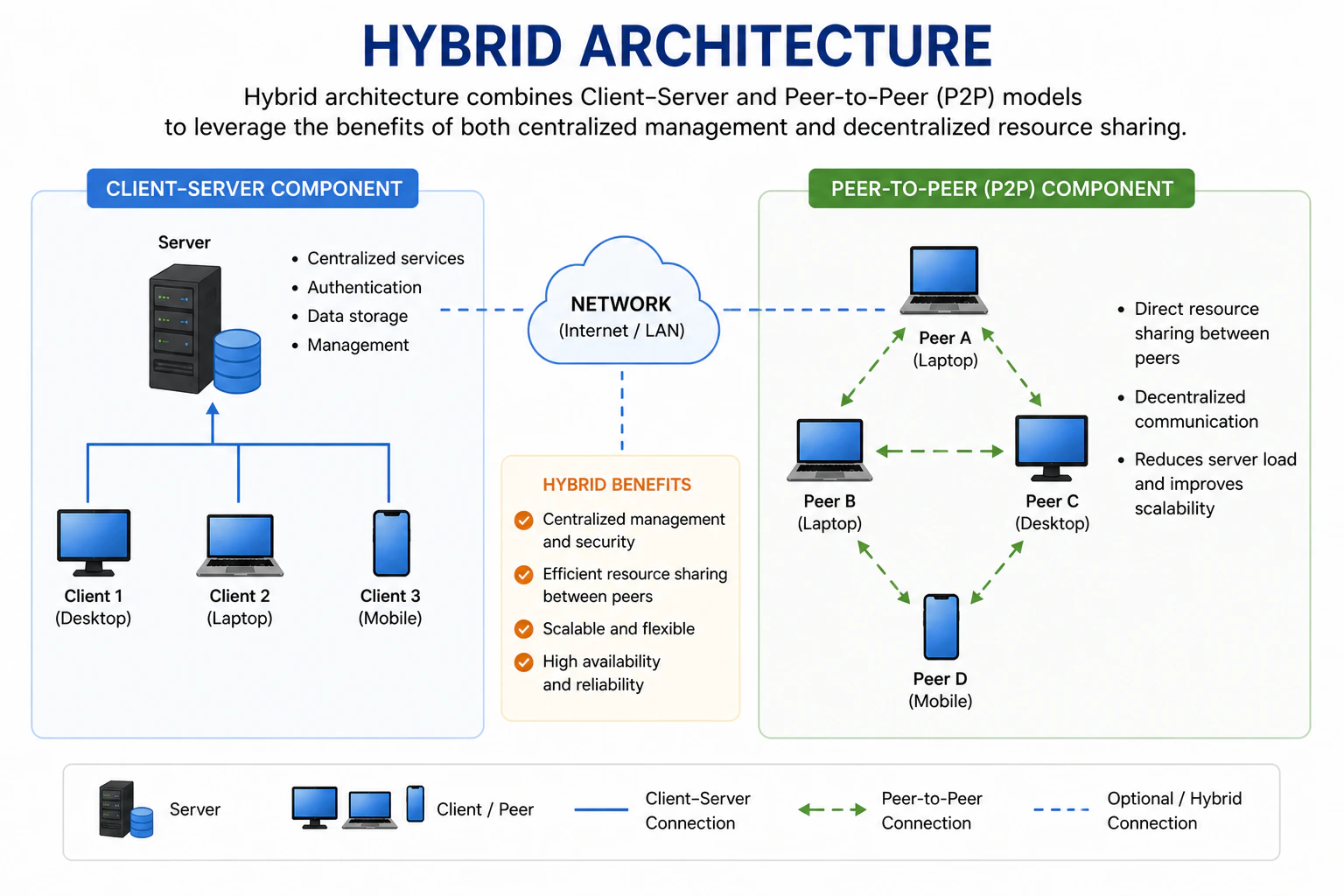 A hybrid architecture **combines** elements of both **client-server** and **peer-to-peer architectures**. In this model, there is a **central server** that **provides certain services**, but **peers** can also **communicate directly** with each other for other services.
* **Central Server**: The central server can **provide services** such as authentication, coordination, or resource management.
* **Peers**: Peers can **communicate directly** with each other for certain tasks, such as file sharing or real-time communication.
Examples of hybrid architectures include social media platforms, where a central server manages user accounts and content, but users can interact directly with each other through messaging or sharing content.
Think of the hybrid architecture like a **community center**.
* **Central Server**: The **community center staff** who manage the facility, provide resources, and coordinate activities.
* **Peers**: The **community members** who can interact with each other directly for various activities.
In this **community center (hybrid architecture)**, the staff (central server) provides certain services and resources, but the community members (peers) can also interact directly with each other for various activities without needing to go through the staff for every interaction.
* Combines the benefits of both client-server and peer-to-peer architectures.
* Can provide better performance and scalability by allowing direct peer-to-peer communication for certain tasks.
* Can offer more robust security by having a central server to enforce security policies while still allowing peer-to-peer interactions.
* Can be more complex to design and implement than either client-server or peer-to-peer architectures alone.
* May require more resources to maintain both a central server and support peer-to-peer interactions.
* Performance can be affected if the central server becomes a bottleneck for certain services or if too many peers are trying to communicate directly with each other.
A hybrid architecture **combines** elements of both **client-server** and **peer-to-peer architectures**. In this model, there is a **central server** that **provides certain services**, but **peers** can also **communicate directly** with each other for other services.
* **Central Server**: The central server can **provide services** such as authentication, coordination, or resource management.
* **Peers**: Peers can **communicate directly** with each other for certain tasks, such as file sharing or real-time communication.
Examples of hybrid architectures include social media platforms, where a central server manages user accounts and content, but users can interact directly with each other through messaging or sharing content.
Think of the hybrid architecture like a **community center**.
* **Central Server**: The **community center staff** who manage the facility, provide resources, and coordinate activities.
* **Peers**: The **community members** who can interact with each other directly for various activities.
In this **community center (hybrid architecture)**, the staff (central server) provides certain services and resources, but the community members (peers) can also interact directly with each other for various activities without needing to go through the staff for every interaction.
* Combines the benefits of both client-server and peer-to-peer architectures.
* Can provide better performance and scalability by allowing direct peer-to-peer communication for certain tasks.
* Can offer more robust security by having a central server to enforce security policies while still allowing peer-to-peer interactions.
* Can be more complex to design and implement than either client-server or peer-to-peer architectures alone.
* May require more resources to maintain both a central server and support peer-to-peer interactions.
* Performance can be affected if the central server becomes a bottleneck for certain services or if too many peers are trying to communicate directly with each other.