> ## Documentation Index
> Fetch the complete documentation index at: https://docs.karchunt.com/llms.txt
> Use this file to discover all available pages before exploring further.
# Network Topologies
## What is Network Topology?
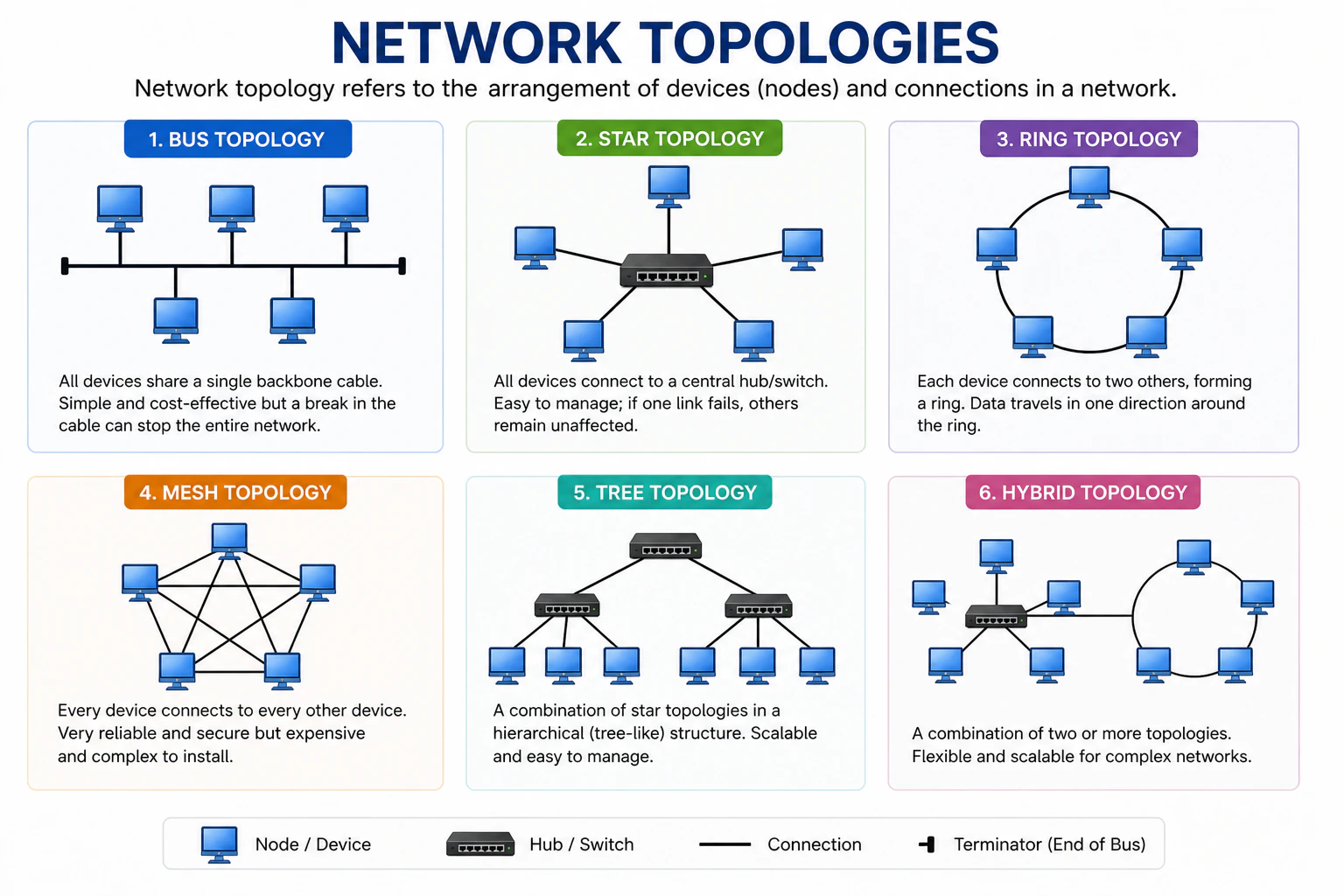
Network topology refers to the **arrangement of devices** (nodes) and **connections** (links) in a computer network. It shows how different **devices are connected** and how **data flows between them**.
You can say that Network Topology is the **"architecture" blueprint of a network** or **layout of the network**. So, this is critical as choosing the right topology can impact the performance, scalability, and reliability of a network.
## Types of Network Topologies
 ### Bus Topology
This topology rarely used today but it's important to understand it as it was one of the earliest network designs.
All devices share a **single backbone/main cable** (the **"bus"**) with a **"terminator"** at each end.
* Pro: Very **cheap** and **easy** to set up for a small room.
* Con: If the **main cable breaks** anywhere, the **entire network crashes**. Plus, data collisions happen often because everyone is "talking" on the same wire.
### Star Topology
This is the most popular topology used in modern LANs and homes.
All devices are connected to a **central hub** or **switch**.
* Pro: If **one cable breaks**, only that device goes offline. The **rest remain unaffected**.
* Con: If the **central hub/switch fails**, the **whole network** goes **down**.
### Ring Topology
In this topology, each device is **connected to exactly two other devices**, forming a **circular data path**. It means that **data travels in one direction** around the circle, passing through each device until it reaches its destination. Here is an example, if there are 5 devices (A, B, C, D, E) connected in a ring topology, the data will flow like this: **A → B → C → D → E → A**.
* Pro: Data flows in an **orderly loop**, so there are **no collisions**.
* Con: The concept is similar to the Bus topology, if one **workstation goes down** or a **cable is cut**, the **loop is broken** and the **whole network stops working**.
### Mesh Topology
In this topology, **every device** is **connected to every other device**. It means that there are **multiple paths for data** to travel between any two devices. For example, if there are 4 devices (A, B, C, D) in a mesh topology, A is connected to B, C, and D; B is connected to A, C, and D; C is connected to A, B, and D; and D is connected to A, B, and C.
* Pro: It's **reliable** because if one path is blocked or a wire is cut, the data just **takes a different "street"** to get there.
* Con: Very **complex** and **expensive** to set up due to the **large number of connections** required. But, the "Wireless Mesh" is common in modern home Wi-Fi systems like Eero or Google Nest, which provides the benefits of a mesh topology without the need for extensive cabling.
Calculation for the number of connections in a mesh topology:\
`N * (N - 1) / 2`, where N is the number of devices. So, if there are 4 devices, the total number of connections would be `4 * (4 - 1) / 2 = 6` connections.
### Tree Topology
This is the standard layout for large corporate networks or school campuses, where you have a central backbone with branches extending out to different departments or buildings.
This topology is a **hierarchical structure** that combines characteristics of both **star** and **bus** topologies. It consists of **multiple levels** of devices, with a **root node** at the top and **branches** extending downwards. Each branch can have its own sub-branches, creating a **tree-like** structure. For example, in a tree topology, you might have a central server (root node - server/router) connected to several switches (branches), and each switch is connected to multiple workstations or devices (sub-branches).
* Pro: It allows for **scalability** and **easy management** of devices. If one branch fails, you can **easily add or remove** devices without affecting the entire network.
* Con: If the **root node fails**, the **entire network** can be affected. Also, it can be more **complex to set up** compared to simpler topologies like star or bus.
You can think of it as **"star of stars"** or **"family tree"**.
### Hybrid Topology
This topology is a **combination of two or more different topologies**. For example, a company might have several **Star topologies** for different departments, all connected together in a **Tree topology** or **Mesh topology** for backbone connectivity.
The hybrid topology allows organizations to **leverage the advantages** of different topologies while **mitigating their weaknesses**.
* Pro: It offers **flexibility** and can be **tailored to specific needs**. You can choose the best topology for each part of the network.
* Con: It can be **complex to design and manage** due to the mix of different topologies. It may require more **resources** and **expertise** to maintain.
## Conclusion
Choosing the right network topology is crucial for ensuring **efficient data flow**, **scalability**, and **reliability** of a network. Each topology has its own advantages and disadvantages, so it's important to consider the **specific needs of your network** when making a decision. Here's a quick summary of the different topologies and their best use cases:
| Topology | Best Use Case | What happens if a device fails? |
| -------- | ------------------------------------------------------- | ------------------------------------------------------------------ |
| Bus | Small, temporary networks | The entire network crashes |
| Star | Home networks, small offices | Only the failed device goes offline |
| Tree | Large corporate networks, school campuses | Only the affected branch is impacted |
| Mesh | High-reliability requirements (Banks, hospitals) | Data finds an alternative path, so the network remains operational |
| Hybrid | Complex network environments (Multi-site organizations) | Impact depends on the specific topology used |
### Bus Topology
This topology rarely used today but it's important to understand it as it was one of the earliest network designs.
All devices share a **single backbone/main cable** (the **"bus"**) with a **"terminator"** at each end.
* Pro: Very **cheap** and **easy** to set up for a small room.
* Con: If the **main cable breaks** anywhere, the **entire network crashes**. Plus, data collisions happen often because everyone is "talking" on the same wire.
### Star Topology
This is the most popular topology used in modern LANs and homes.
All devices are connected to a **central hub** or **switch**.
* Pro: If **one cable breaks**, only that device goes offline. The **rest remain unaffected**.
* Con: If the **central hub/switch fails**, the **whole network** goes **down**.
### Ring Topology
In this topology, each device is **connected to exactly two other devices**, forming a **circular data path**. It means that **data travels in one direction** around the circle, passing through each device until it reaches its destination. Here is an example, if there are 5 devices (A, B, C, D, E) connected in a ring topology, the data will flow like this: **A → B → C → D → E → A**.
* Pro: Data flows in an **orderly loop**, so there are **no collisions**.
* Con: The concept is similar to the Bus topology, if one **workstation goes down** or a **cable is cut**, the **loop is broken** and the **whole network stops working**.
### Mesh Topology
In this topology, **every device** is **connected to every other device**. It means that there are **multiple paths for data** to travel between any two devices. For example, if there are 4 devices (A, B, C, D) in a mesh topology, A is connected to B, C, and D; B is connected to A, C, and D; C is connected to A, B, and D; and D is connected to A, B, and C.
* Pro: It's **reliable** because if one path is blocked or a wire is cut, the data just **takes a different "street"** to get there.
* Con: Very **complex** and **expensive** to set up due to the **large number of connections** required. But, the "Wireless Mesh" is common in modern home Wi-Fi systems like Eero or Google Nest, which provides the benefits of a mesh topology without the need for extensive cabling.
Calculation for the number of connections in a mesh topology:\
`N * (N - 1) / 2`, where N is the number of devices. So, if there are 4 devices, the total number of connections would be `4 * (4 - 1) / 2 = 6` connections.
### Tree Topology
This is the standard layout for large corporate networks or school campuses, where you have a central backbone with branches extending out to different departments or buildings.
This topology is a **hierarchical structure** that combines characteristics of both **star** and **bus** topologies. It consists of **multiple levels** of devices, with a **root node** at the top and **branches** extending downwards. Each branch can have its own sub-branches, creating a **tree-like** structure. For example, in a tree topology, you might have a central server (root node - server/router) connected to several switches (branches), and each switch is connected to multiple workstations or devices (sub-branches).
* Pro: It allows for **scalability** and **easy management** of devices. If one branch fails, you can **easily add or remove** devices without affecting the entire network.
* Con: If the **root node fails**, the **entire network** can be affected. Also, it can be more **complex to set up** compared to simpler topologies like star or bus.
You can think of it as **"star of stars"** or **"family tree"**.
### Hybrid Topology
This topology is a **combination of two or more different topologies**. For example, a company might have several **Star topologies** for different departments, all connected together in a **Tree topology** or **Mesh topology** for backbone connectivity.
The hybrid topology allows organizations to **leverage the advantages** of different topologies while **mitigating their weaknesses**.
* Pro: It offers **flexibility** and can be **tailored to specific needs**. You can choose the best topology for each part of the network.
* Con: It can be **complex to design and manage** due to the mix of different topologies. It may require more **resources** and **expertise** to maintain.
## Conclusion
Choosing the right network topology is crucial for ensuring **efficient data flow**, **scalability**, and **reliability** of a network. Each topology has its own advantages and disadvantages, so it's important to consider the **specific needs of your network** when making a decision. Here's a quick summary of the different topologies and their best use cases:
| Topology | Best Use Case | What happens if a device fails? |
| -------- | ------------------------------------------------------- | ------------------------------------------------------------------ |
| Bus | Small, temporary networks | The entire network crashes |
| Star | Home networks, small offices | Only the failed device goes offline |
| Tree | Large corporate networks, school campuses | Only the affected branch is impacted |
| Mesh | High-reliability requirements (Banks, hospitals) | Data finds an alternative path, so the network remains operational |
| Hybrid | Complex network environments (Multi-site organizations) | Impact depends on the specific topology used |