
What is Network Topology?
Network topology refers to the arrangement of devices (nodes) and connections (links) in a computer network. It shows how different devices are connected and how data flows between them. You can say that Network Topology is the “architecture” blueprint of a network or layout of the network. So, this is critical as choosing the right topology can impact the performance, scalability, and reliability of a network.Types of Network Topologies
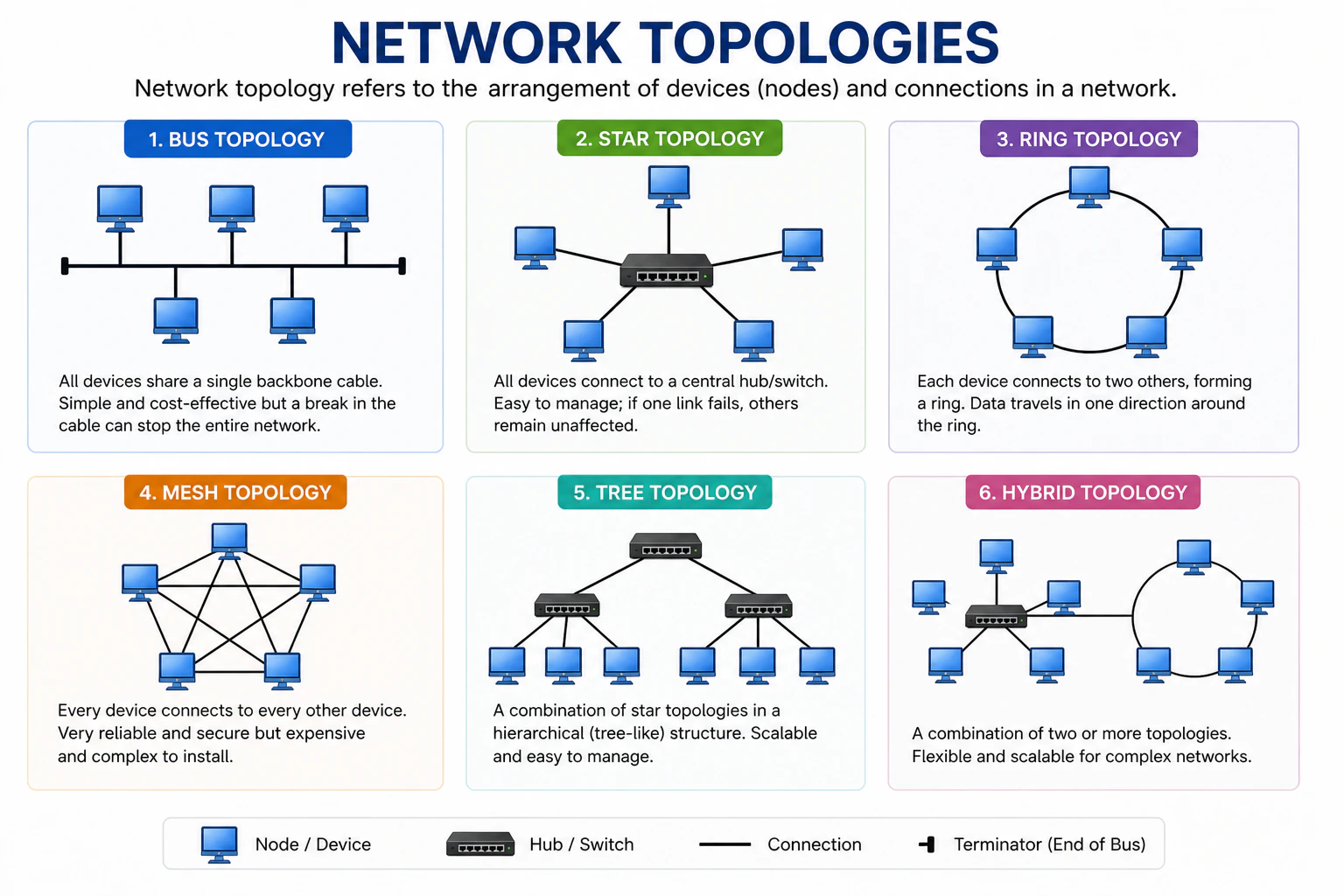
Bus Topology
This topology rarely used today but it’s important to understand it as it was one of the earliest network designs.
- Pro: Very cheap and easy to set up for a small room.
- Con: If the main cable breaks anywhere, the entire network crashes. Plus, data collisions happen often because everyone is “talking” on the same wire.
Star Topology
This is the most popular topology used in modern LANs and homes.
- Pro: If one cable breaks, only that device goes offline. The rest remain unaffected.
- Con: If the central hub/switch fails, the whole network goes down.
Ring Topology
In this topology, each device is connected to exactly two other devices, forming a circular data path. It means that data travels in one direction around the circle, passing through each device until it reaches its destination. Here is an example, if there are 5 devices (A, B, C, D, E) connected in a ring topology, the data will flow like this: A → B → C → D → E → A.- Pro: Data flows in an orderly loop, so there are no collisions.
- Con: The concept is similar to the Bus topology, if one workstation goes down or a cable is cut, the loop is broken and the whole network stops working.
Mesh Topology
In this topology, every device is connected to every other device. It means that there are multiple paths for data to travel between any two devices. For example, if there are 4 devices (A, B, C, D) in a mesh topology, A is connected to B, C, and D; B is connected to A, C, and D; C is connected to A, B, and D; and D is connected to A, B, and C.- Pro: It’s reliable because if one path is blocked or a wire is cut, the data just takes a different “street” to get there.
- Con: Very complex and expensive to set up due to the large number of connections required. But, the “Wireless Mesh” is common in modern home Wi-Fi systems like Eero or Google Nest, which provides the benefits of a mesh topology without the need for extensive cabling.
Calculation for the number of connections in a mesh topology:
N * (N - 1) / 2, where N is the number of devices. So, if there are 4 devices, the total number of connections would be 4 * (4 - 1) / 2 = 6 connections.Tree Topology
This is the standard layout for large corporate networks or school campuses, where you have a central backbone with branches extending out to different departments or buildings.
- Pro: It allows for scalability and easy management of devices. If one branch fails, you can easily add or remove devices without affecting the entire network.
- Con: If the root node fails, the entire network can be affected. Also, it can be more complex to set up compared to simpler topologies like star or bus.
Hybrid Topology
This topology is a combination of two or more different topologies. For example, a company might have several Star topologies for different departments, all connected together in a Tree topology or Mesh topology for backbone connectivity. The hybrid topology allows organizations to leverage the advantages of different topologies while mitigating their weaknesses.- Pro: It offers flexibility and can be tailored to specific needs. You can choose the best topology for each part of the network.
- Con: It can be complex to design and manage due to the mix of different topologies. It may require more resources and expertise to maintain.